Want to play manhunt yourself?
Feel like chasing your friends through the city? We built the app for exactly that. No external game master, no manual location sharing.
View demo replay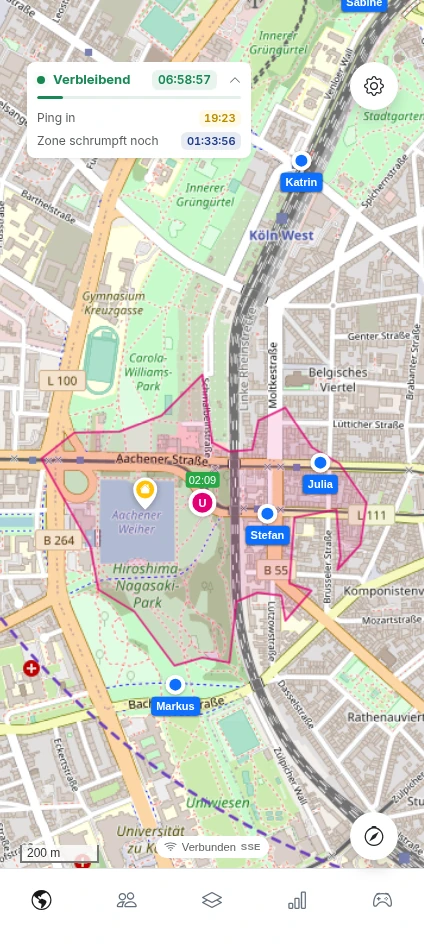
Legal notice on independence
Chasify is an independent, privately run hobby project. There is no legal, organizational, or economic connection to Manhunt Media GmbH (Vienna) or the video production "Manhunt". The platform merely provides generic infrastructure for location-based chasing and hiding games.
How does it work?
You create a game and invite your friends simply via link or QR code. The Chasify Tracker app handles GPS tracking. Every player installs it and links it to the game.
Pings
The hunter team receives all players' locations at regular intervals. Players never see the hunters' location.
Game zones
Set your game zone flexibly yourself. All players must stay within this zone at all times. Optionally, the zone can shrink over the course of the game. We currently support circular zones.
Jokers
Players have two jokers available. A block lets them skip a regular location ping. They can also check the hunters' location at any time.
Speedhunts
The hunter team can trigger an additional, targeted location ping on a specific player. Players get notified when a speedhunt starts but don't know who it's targeting.
Analysis
You can watch the entire course of your game in a replay. Besides stats on distance covered and survival time, it's especially exciting to relive the chases.
No account needed
There's no registration and no profile. You join a game via link or QR code and simply pick a name. Seven days after the game, the entire session, including all location data, is deleted automatically.
Two apps, one hunt
Why two apps? While Chasify provides the live map, game features, and stats, the Chasify Tracker app handles location transmission. It runs reliably in the background to keep GPS tracking active.
Let's go
Two quick setups on each device, then nothing stands between you and your first game.
 Install app
Chasify runs right in your browser. For the best app experience, add it to your home screen.
- 1 Open this page in Chrome, Edge, or another browser that can install apps.
- 2 Click the install icon in the address bar (or "Install app" in the menu).
- 3 Confirm the installation.
 Connect tracker
Every player now links the two apps to ensure stable GPS tracking. Install the Chasify Tracker app to do so.
- 1 Install the app from the App Store (iOS) or the Play Store (Android).
- 2 Click "Connect tracker" or enter the game code and PIN.
- 3 Once the first signal arrives, the device appears live on the map.


Feedback & Inquiries
Found a bug, have a feature idea, or just a question? We'd love to hear from you.
contact@chasify.io